Smart Building Access Control Guide for Connected Properties
A practical smart building access control guide covering connected doors, credentials, visitor access, integration, privacy, offline operation, and lifecycle management.
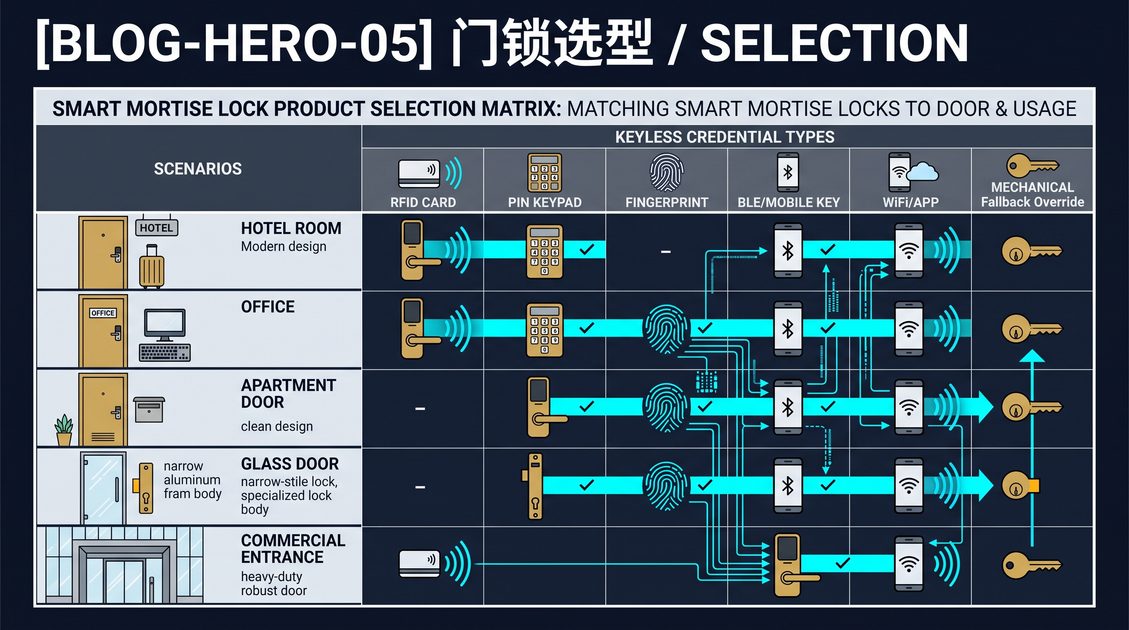
A smart building access control system connects electronic locks, credentials, controllers, sensors, and management software so a property team can control entry by person, door, and schedule. It may cover apartment entrances, offices, shared amenity rooms, service areas, and individual units, while preserving local operation when the network is unavailable. This smart building access control guide explains how to plan the architecture, manage visitors and residents, protect privacy, integrate other building systems, and keep the installation maintainable over time.
Smart Building Access Control Guide: Define the Building Model
Begin with a door and user map. List public entrances, resident or employee doors, amenity rooms, service areas, emergency exits, and restricted rooms. For each opening, record the hardware, frame, door type, fire or egress status, required credential, and whether events must be logged. Then define user groups such as residents, staff, contractors, visitors, and emergency personnel.
A smart building access control design should reflect the property’s operating model rather than force every door into one template. A lobby may use an intercom and mobile credential, a service entrance may need an RFID card and schedule, and an apartment door may use a keypad or smart mortise lock. Consistency helps administration, but physical and safety differences must remain visible in the specification.
Smart Building Access Control Guide: Credentials and Visitors
Use individual credentials where accountability matters. Mobile credentials, cards, fobs, PINs, and biometrics each have different convenience, cost, privacy, and recovery implications. A visitor workflow should issue time-limited access, identify the host or destination, and revoke access automatically at the end of the visit. Avoid shared credentials that make an audit unable to identify the actual user.
Lost credentials need immediate revocation, and staff departures need a documented offboarding process. A system should make these tasks simple enough that operators actually perform them. Keep an emergency credential and a mechanical or backup-power recovery path, especially at doors that must remain accessible during a network or power outage.
Smart Building Access Control Guide: Integration and Privacy
Integration may connect access control to property management, visitor management, elevators, video intercoms, energy management, or a security operations platform. Define which system owns the user record and which system owns the door decision. Avoid duplicated user databases that drift apart. Test synchronization delay, account recovery, and offline behavior before relying on an integration for daily operations.
Access events are sensitive information. Limit visibility by role, protect communication and stored data, set a retention period, and explain the policy to residents and employees. Biometric data requires particular care because it cannot be replaced like a password. Prefer local encrypted templates where appropriate and collect only the information needed for the stated operation.
Smart Building Access Control Guide: Commissioning and Lifecycle
Pilot representative doors before scaling. Test valid, expired, revoked, and invalid credentials, visitor expiry, door-position events, inside egress, manual override, battery warnings, power interruption, network loss, and controller recovery. Confirm that alerts reach the responsible team and that an operator can follow the written recovery procedure without relying on one installer.
Lifecycle management includes battery and firmware maintenance, permission reviews, spare parts, documentation, and supplier support. This smart building access control guide is general information; obtain qualified review for fire, accessibility, electrical, privacy, building, and emergency-egress requirements before procurement.
A successful rollout treats the building as a whole rather than a collection of doors. Publish one policy for who holds which access, connect the door events to the people responsible for them, and test visitor expiry and staff offboarding with the same care as the hardware. Revisit the access map after renovations, staff changes, and tenant turnover, and confirm that the emergency procedure is always current. This discipline is what keeps a connected access system secure as the building evolves.
Confirm the access policy is legible to residents and employees, because a system people do not understand gets ignored or bypassed. Provide a simple way to report a lost credential, a clear notice about what is recorded, and an easy channel to update access as roles change. A connected building is only as secure as the people who use it, so make the policy visible, the procedures simple, and the emergency path obvious at every door.
Not sure which sensor fits your project?
Talk to our mmWave application engineers for a free consultation.
Specify your hotel project with our engineers
Send your room count, ceiling type, and protocol preference. We will return a sample plan and quote within 24 business hours.
- Move from general guidance into a product or application discussion.
- Use RFQ when pricing, drawings, MOQ, or launch timing needs structure.
- Keep a direct contact path visible for fast clarifications and handoff.