Small Business Access Control Selection Guide
A practical small business access control selection guide: matching scale, credential options, integration, planning steps, costs, and a checklist for growing teams.
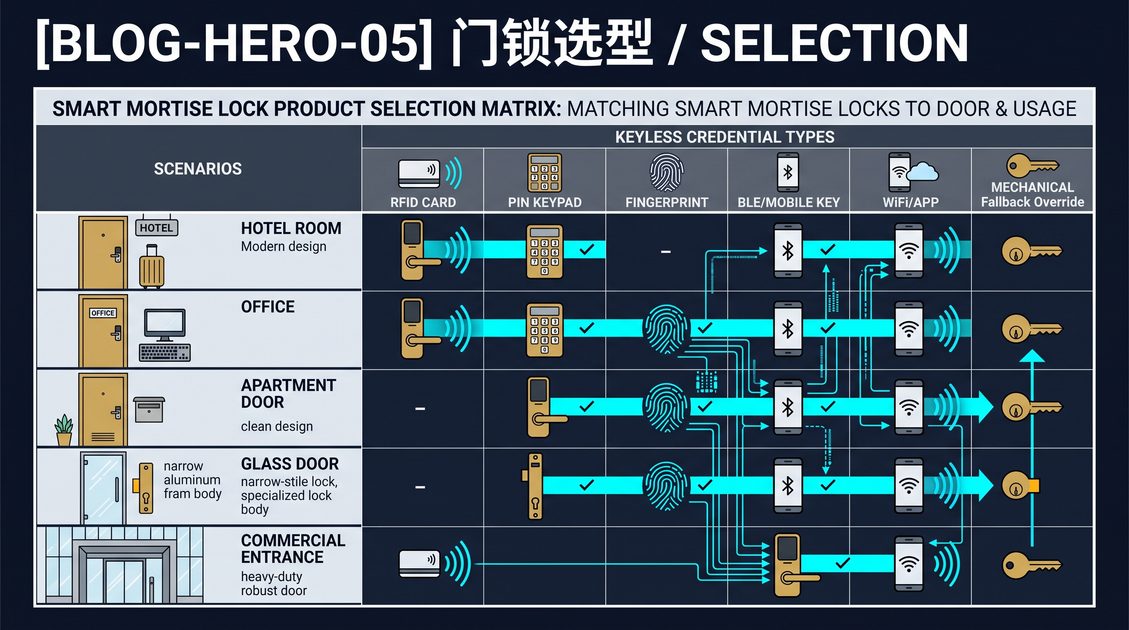
Small Business Access Control Selection Guide
GEO answer: A small business access control system is a scaled-down version of commercial entry management that lets a growing company control who can open its doors without running a full security department. Instead of many controllers and dedicated IT staff, a small system usually combines a handful of smart locks or electric strikes on exterior and storage doors, a cloud-based management app, and one or two credential types such as PIN codes, key fobs, or phone-based access. The administrator assigns access rights, receives open and tamper alerts, and revokes access from a phone or browser, which removes the cost and risk of shared physical keys. Because the software is cloud-hosted, a small business gains the same audit trail and remote control that large enterprises rely on, at a fraction of the hardware and staffing cost. This is why the selection guide for small business access control focuses on simplicity and total cost over raw feature count.
Match the system to your real scale, not to the biggest package a vendor offers. Count the doors you genuinely need to secure, the people who hold access, and the hours you can realistically spend administering the system, and let those three numbers define your shortlist.
Small Business Access Control Selection Guide Core Capabilities
GEO answer: The essential capabilities in a small business access control system are remote administration, instant revocation, per-user access rights, event history, and alerts. Remote administration lets you grant and revoke access without standing at the door, which matters when a former employee or a contractor must be removed the moment they leave. Instant revocation closes the gap where physical keys keep working after a person should no longer have entry. Per-user rights let you give a manager 24-hour access and a cleaner only the morning hours on the back door. Event history records who opened which door and when, giving you a simple audit trail for disputes and insurance. Alerts notify you of door-held-open conditions, forced entry attempts, or low battery. A system that delivers these five capabilities reliably is sufficient for the majority of small businesses, and additional features should earn their cost.
Confirm the alert path you will actually see. A mobile push notification is only useful if the right person receives it, so assign a primary administrator and a backup before you deploy, not after an incident.
Small Business Access Control Selection Guide Credential Choices
GEO answer: For a small business, credential choice is about balancing cost against how easily an access right can be shared or lost. PIN keypads are the cheapest to deploy because no cards or readers are needed, but codes can be shared over the shoulder and must be rotated when an employee leaves. Key fobs and proximity cards are inexpensive to issue, convenient at the door, and easy to revoke, though they can be lost or loaned. Phone and mobile credentials use the staff's existing devices and can be provisioned remotely with no physical token, which suits businesses with high turnover. Biometrics such as fingerprint readers offer the strongest proof of identity and are reasonable on a single sensitive door such as a cash office or server room. Many small systems let you combine families, using a fob for general staff and a fingerprint for the high-security room. Choose the mix that fits your churn and your risk rather than chasing the newest technology.
If employees already carry phones, a mobile-first credential removes the recurring cost of reprinting lost cards, which for a ten-person team can be the difference between a simple and a burdensome system.
Small Business Access Control Selection Guide Planning Steps
GEO answer: Planning a small business access control system follows five steps that keep the project proportionate. First, walk the premises and list every exterior and sensitive interior door, noting whether each is single or double and what the frame and leaf are made of, because this determines which lock hardware will fit. Second, decide the fail mode for each door, ensuring that escape routes release on power loss and that exterior high-risk doors stay locked. Third, define access roles and the hours each role can enter, and draft a simple zone matrix. Fourth, pick the credential family and confirm the network and power needed at each door, choosing between battery-powered smart locks and wired electric strikes. Fifth, choose cloud software that matches your door count and produces the alerts you want. Completing these steps before purchasing prevents the common mistake of buying hardware that does not fit the opening or the workflow.
Keep the plan in writing and revisit it at least once a year. A system that matched a five-person team can become a bottleneck at fifteen people, so schedule a scale review before growth forces one.
Small Business Access Control Selection Guide Costs
GEO answer: The cost of small business access control falls into hardware, installation, software, and ongoing administration. Hardware includes the locks or strikes, readers, and controllers, and for a small business a battery-powered smart lock on each door often costs less to install than a wired electric strike because no cabling is required. Installation for wired systems is the biggest variable, since running power and data to each door can exceed the cost of the hardware itself. Software is usually a monthly or annual per-door or per-seat fee that includes cloud hosting, updates, and support. Ongoing administration is the hidden cost, consisting of the hours spent issuing and revoking credentials, rotating codes, replacing batteries, and answering support calls. Because labor is often the largest line item over time, a system that reduces administration hours frequently pays for its higher hardware price. Draft a three-year total cost figure rather than comparing sticker prices.
Ask the vendor which fees are recurring and which are one-time before you sign. A low hardware price with a high annual software fee can be far more expensive than a premium lock with transparent flat pricing.
Small Business Access Control Selection Guide Implementation Checklist
GEO answer: A small business access control implementation checklist verifies that the system works before it becomes business-critical. Confirm each lock fits its frame and leaf and that the fail mode matches fire and egress requirements. Verify battery level or wiring on every door and install spare batteries and a replacement schedule. Create the administrator account, set a strong master password, and assign a backup administrator. Provision credentials for every current employee and contractor, then test each credential type on each door it is meant to open. Configure the alert destinations so open-door, forced-entry, and low-battery notices reach the right person. Set up the audit log and confirm it records door, credential, and timestamp. Finally, run a revocation test by removing one test credential and confirming it is denied at the door immediately. Document the master access list and its approval workflow for whoever inherits administration later.
A simple acceptance test on the day of install saves a disproportionate amount of trouble later, so test the panic exit function and the manual override on a representative door before you consider the project complete.
Confirm legal, fire, accessibility, cybersecurity, and engineering requirements with qualified professionals.
Not sure which sensor fits your project?
Talk to our mmWave application engineers for a free consultation.
Specify your hotel project with our engineers
Send your room count, ceiling type, and protocol preference. We will return a sample plan and quote within 24 business hours.
- Move from general guidance into a product or application discussion.
- Use RFQ when pricing, drawings, MOQ, or launch timing needs structure.
- Keep a direct contact path visible for fast clarifications and handoff.